Security Verification
InterGenOS asks you to verify, not trust. Every security claim on this site is something you can check yourself, on your own machine, with a command whose output you can read. This page lists the core claims, the command that proves each one, and what a healthy system shows.
Security is not first. It is only — and a security claim you cannot check is just marketing. So check.
The project’s AI seats review this code under Anthropic’s Cyber Verification Program (July 2026) and OpenAI’s Daybreak Blue / Trusted Access for Cyber program (September 2026) — verified access for security work on systems we are authorized to protect. It changes nothing on this page: every claim below is still yours to check.
Run these as yourself; a few need
sudo. None of them change anything — they read state and report it.
The boot chain is signed — and Secure Boot enforces it once you enable it
Claim: the machine boots a signed chain (shim → GRUB → Unified Kernel Image), anchored to your Machine Owner Key. Secure Boot enforcement is validated end to end — now on real hardware, not only in VMs — and one enrollment away: the signed chain is provisioned on every install, but enforcement ships off by default, and turning it on is a one-time MOK enrollment you perform yourself.
$ mokutil --sb-state
$ bootctl status
mokutil --sb-state reports whether Secure Boot is enabled; bootctl status shows the active boot loader, the signed entries, and the firmware’s Secure Boot state. On a default install mokutil --sb-state reports Secure Boot disabled — that is expected: the signed chain is in place, but enforcement ships off. After the one-time enrollment at first boot it reports enabled, with your own Machine Owner Key trusting the chain. The full walkthrough is in Verified Boot & Secure Boot.
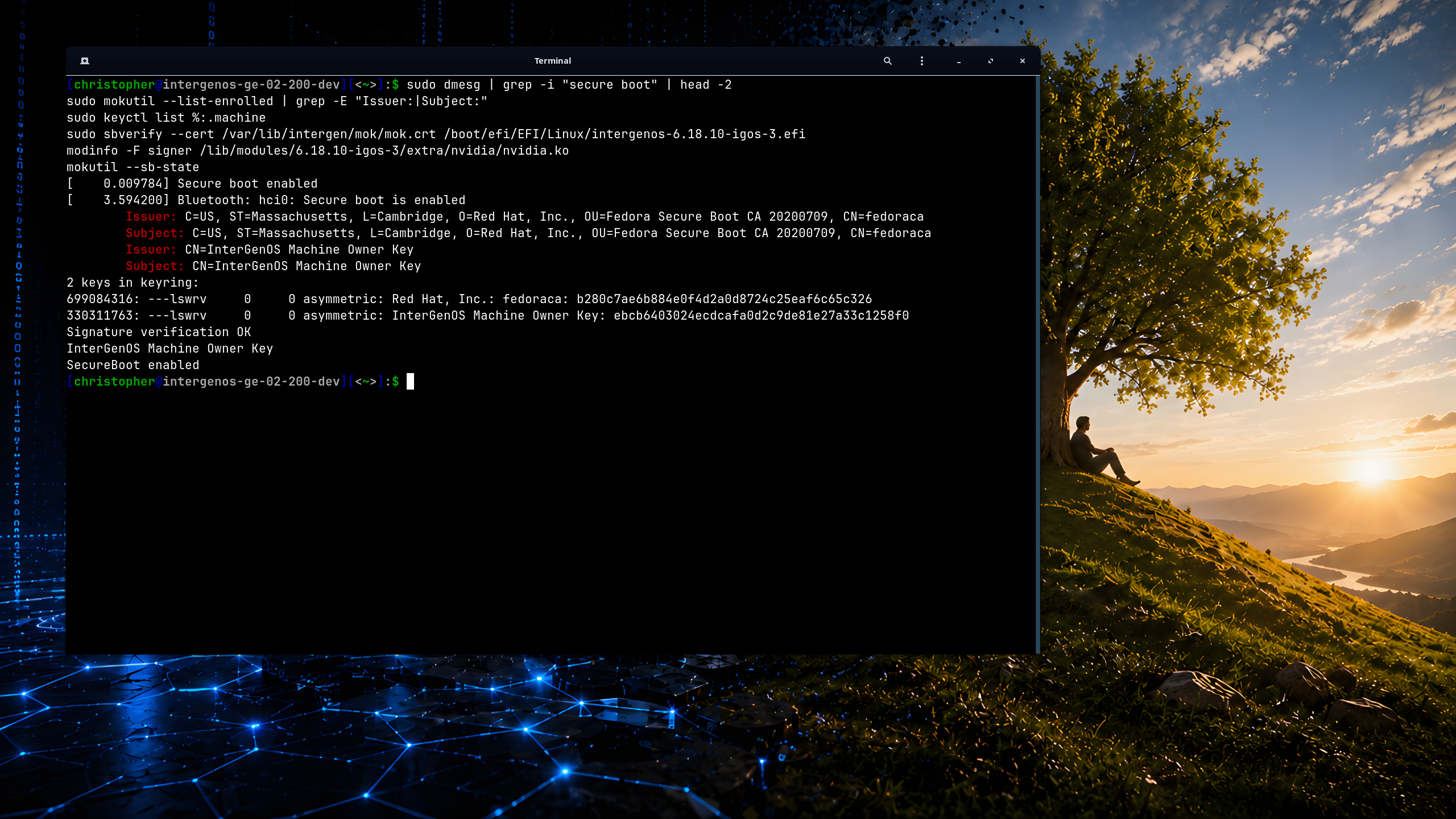
The whole claim in one frame, on real hardware — an ASUS ROG laptop with an NVIDIA GeForce RTX 3070: InterGenOS booted under enforced Secure Boot, the kernel confirming it nine milliseconds in, the chain anchored to your own enrolled Machine Owner Key (CN=InterGenOS Machine Owner Key) alongside the shim’s Fedora CA, the signed Unified Kernel Image verifying against your key, and even the third-party NVIDIA driver loaded — because it, too, was signed by that same key. Enforcement ships off by default; this is the state after you enable it. Every line is something you run and read yourself.
The same matrix has been confirmed with full-disk encryption active — Secure Boot enforcing the chain while a LUKS2-encrypted root unlocks behind it, GRUB carrying its own SBAT record so the chain Secure-Boots with no hand-patching. That combined proof, and the boot itself, are shown on the Verified Boot & Secure Boot page. Secure Boot is off by default; turning it on is the one-time MOK enrollment described there.
The boot chain verified end to end
Claim: verification actually happened at boot — it is not just configured, it ran, and nothing failed.
$ journalctl -b | grep -iE 'sb_verify|mok|verification'
A healthy boot shows the signature-verification events with zero failures. This is the difference between “Secure Boot is enabled” and “Secure Boot verified this exact boot.”
The root image is integrity-sealed (dm-verity)
Claim: the live system image cannot be tampered with — its integrity is sealed by a cryptographic root hash baked into the signed boot image, and checked before it is used.
Run these on a booted live ISO (the seal protects the live medium — see below for why an installed system has no verity device to inspect):
$ sudo veritysetup status igos-root
$ cat /proc/cmdline | tr ' ' '\n' | grep verity
$ journalctl -b -k | grep -i verity
The sealed igos.verity.roothash lives on the kernel command line inside the signed UKI, so the hash that gates the image is itself covered by the boot signature. At boot, the init path verifies the squashfs against that hash before mounting it — a mismatch stops the boot rather than running a modified image. dm-verity seals the read-only image that the live ISO and the installer boot; once InterGenOS is installed to a writable root, per-file integrity is enforced instead by the signed UKI plus pkm verify (next section) — so on an installed system, integrity is proven by signature and content hash rather than by a dm-verity device.
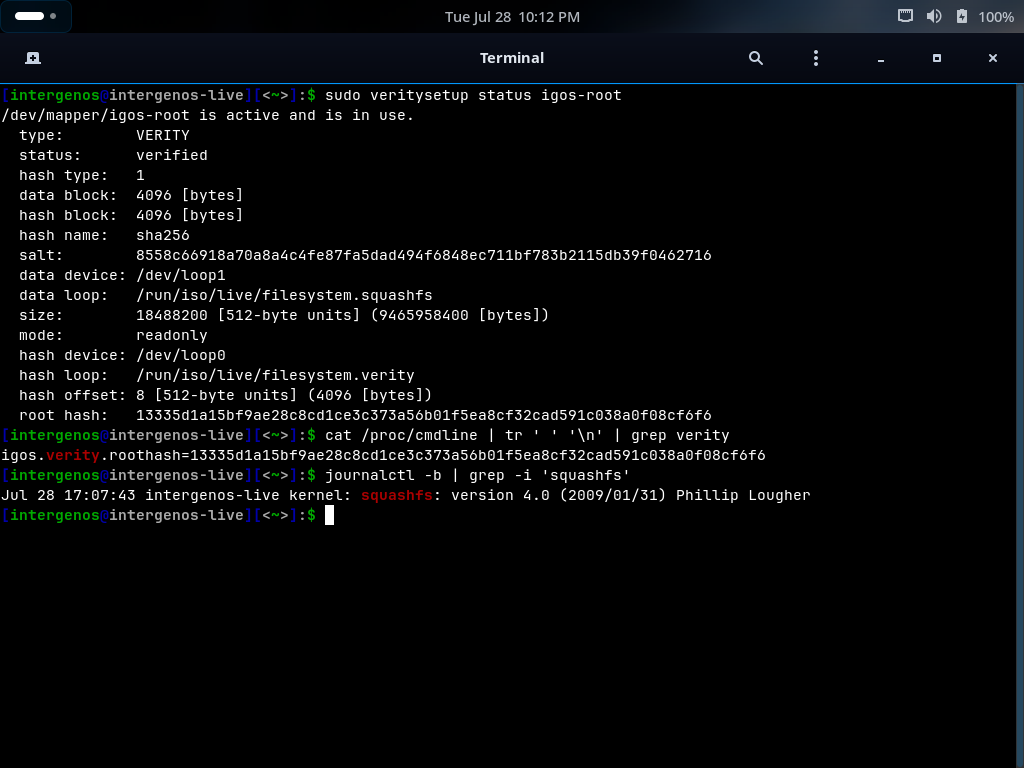 The seal, verified end to end on a live boot:
 veritysetup status igos-root reports status: verified over the read-only squashfs, and its root hash is byte-identical to the igos.verity.roothash value on the kernel command line — the command line that the UKI signature covers.
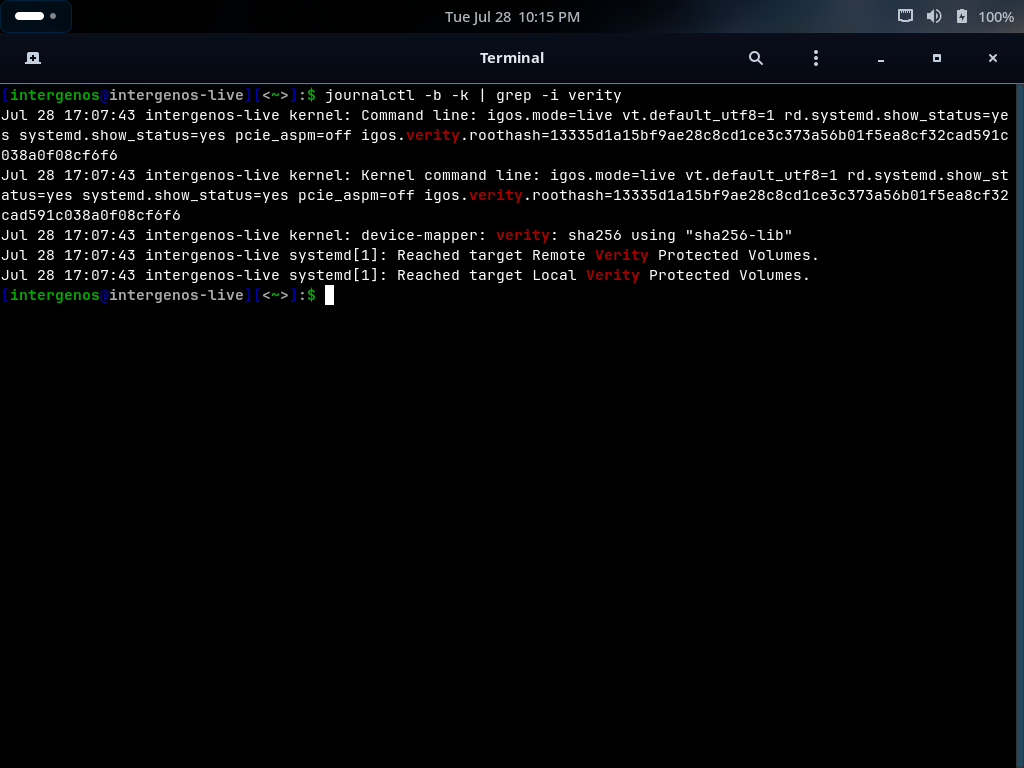 The kernel’s own record of the same boot: the command line carrying the sealed root hash, and
 device-mapper: verity: sha256 initializing the verified device. The two systemd “Reached target … Verity Protected Volumes” lines also matched by this grep are generic unit-ordering messages that appear on any systemd machine — the evidence of the seal is the command-line and device-mapper lines, not those.
Every installed file matches what was published
Claim: the files on disk are exactly the files in the signed release — nothing was swapped, corrupted, or silently altered.
$ pkm verify --all
Verified (strict): 831 ok, 0 with issues; 11 expected-absent: 9 ch8-la-sweep, 2 volatile-run
pkm records a SHA-256 for every file it installs and re-checks them on demand. A clean system reports every package ok with 0 issues. (The expected-absent entries are files a package’s own post-install step intentionally removes — pkm tracks them so they are never mistaken for tampering or loss; the exact totals track your installed set.) This is the installed-system analogue of the install-time integrity gate: the gate proves what was written, pkm verify proves it stayed that way.
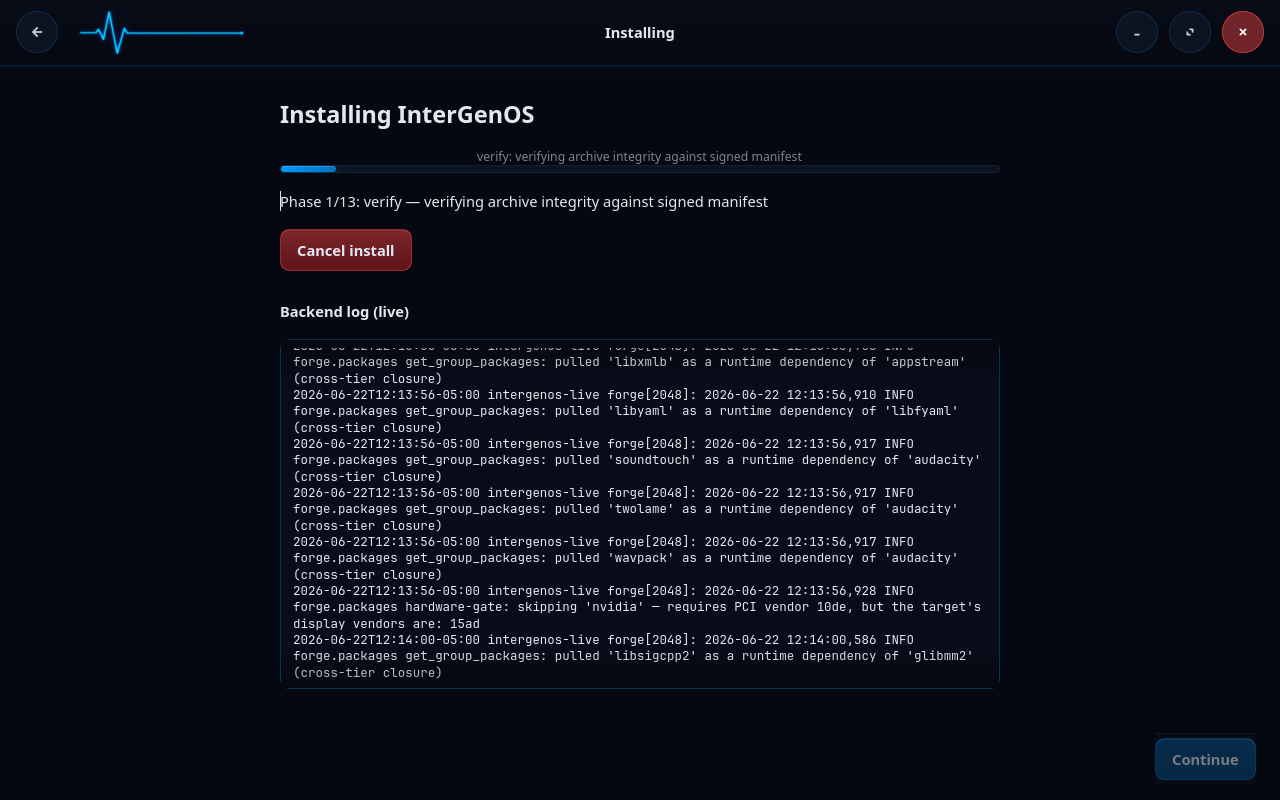
That install-time gate is the very first thing Forge does — before it writes a single file, it verifies the archive set against the release-signed manifest:
The package index is signed by the release key
Claim: updates come only from a package index signed by the InterGenOS release key — a swapped or tampered mirror is rejected, not silently trusted.
$ pkm sync
When pkm syncs the index it verifies the index signature with gpgv against a release-key fingerprint pinned into pkm itself — so even a mirror that presents a different valid-looking key is refused. A good sync prints Signature: Good — … ✓, naming the signing subkey; internally that is a gpgv VALIDSIG check against the pinned fingerprint, and you can confirm the fingerprint matches the published release key.
The kernel is locked down and enforcing
Claim: the running kernel is in integrity lockdown, refuses unsigned modules, has the full security-module stack active, and ships a default-deny firewall.
$ cat /sys/kernel/security/lockdown          # none [integrity] confidentiality — the bracketed mode is active
$ cat /sys/module/module/parameters/sig_enforce   # Y — unsigned modules rejected
$ sudo nft list ruleset | head               # input policy drop (default-deny)
$ systemctl --failed                         # 0 loaded units failed
A healthy InterGenOS system shows lockdown engaged at integrity, sig_enforce=Y, the LSM stack (lockdown / IMA / landlock / AppArmor) active, an nftables ruleset whose input policy is drop, and no failed units. These are the steady-state guarantees the Security Handbook describes — here you confirm them yourself.
Where to go next
- Reproducibility & Verification — rebuild a package from source and confirm it matches the published artifact, byte for byte.
- Package & Config Reference — the full package set, tiers, and configuration the system is built from.
- Security Handbook — the design behind each guarantee you just verified.
- Verified Boot & Secure Boot — the MOK, signed GRUB, dm-verity, and UKI-signing model in depth.